Helium 10 Killed Review Insights: 5 Tested Alternatives
Helium 10's Review Insights is gone since Dec 2025. We tested the real alternatives for scraping AND analyzing Amazon reviews. See which tools actually work.
On December 3, 2025, Helium 10 removed Review Insights from its Chrome Extension. They cited Amazon's updated policies. A redesigned version was promised for early 2026. As of July 2026—seven months deep into the Review Insights Gap—nothing has shipped. If you relied on that feature to pull and filter Amazon reviews, you're stuck. And if you were on the $49/mo Starter plan? Helium 10 killed that in April. Cheapest option now is $99/mo. We stopped waiting for them to fix it. Here are the five tools sellers are actually using to close the Review Insights Gap—and which one matches what you actually need.
Why Helium 10 Review Insights is Not Working — and Is It Coming Back?
The December 3 removal
Helium 10 didn't choose this. Amazon changed its Chrome Extension policy (Manifest V3) and enforced stricter rules on how extensions can scrape data. Review Insights violated those rules, so Helium 10 had to shut it down.
The frustration isn't the removal. It's the silence. Helium 10 said a redesign was coming "early 2026." Nothing. Radio silence. Sellers built workflows around that feature. Now it's gone, and there's no clear path back.
The redesign that isn't shipping
Here's what we know: Helium 10's own knowledge base says "Temporarily Unavailable." But seven months in? "Temporarily" doesn't mean anything anymore.
You have two choices: Wait and hope, or find a tool that actually works today.
The Two Jobs Review Insights Did
Review Insights wasn't one thing. Most sellers used it for two very different jobs — and the right replacement depends on which job you actually need to fill.
Job #1: Scrape reviews — Get raw review data out of Amazon so you can filter and analyze it yourself with full control. Export to CSV. Filter by star rating or date range. Work with the data in your own way, for instance if you want to run a sentiment analysis or use ChatGPT to analyze your Amazon reviews.
Job #2: Analyze reviews — Have a tool automatically extract themes, complaints, and insights from reviews and tell you what they mean for your listing or product development.
These are not the same job. A tool that's great at raw extraction may be useless for analysis, and vice versa. Pick wrong and you'll spend more time in the tool than outside it.
How We Tested
We picked one real Amazon product (ASIN B01M3VVK7U), mid-tier traffic, 1,352 reviews, not category-sensitive. We ran each tool through it and scored them against two separate rubrics: one for scrapers, one for analyzers.
One important context: Amazon publicly shows ~10 reviews on a product page at a time. Some extension-based tools are limited to just those visible reviews, where you dont need a valid login. The real value is in the review detail page where one can read hundreds of reviews.
Let's go job by job.
Job #1: Scraping Reviews — Get Your Raw Data
If you want raw reviews to filter and analyze yourself, these are your options.
SellerSprite
What it does: Pulls reviews into a filterable table, exportable to Excel/CSV. Browser extension that pages through Amazon review pages automatically.
How it works: Two separate tools in one product. The browser extension pages through Amazon's review pages and exports raw data to Excel — that's the scraping job. The web platform's AI Review Analysis runs independently (top 300 reviews, sentiment across 6 dimensions) — that doesn't require the extension.
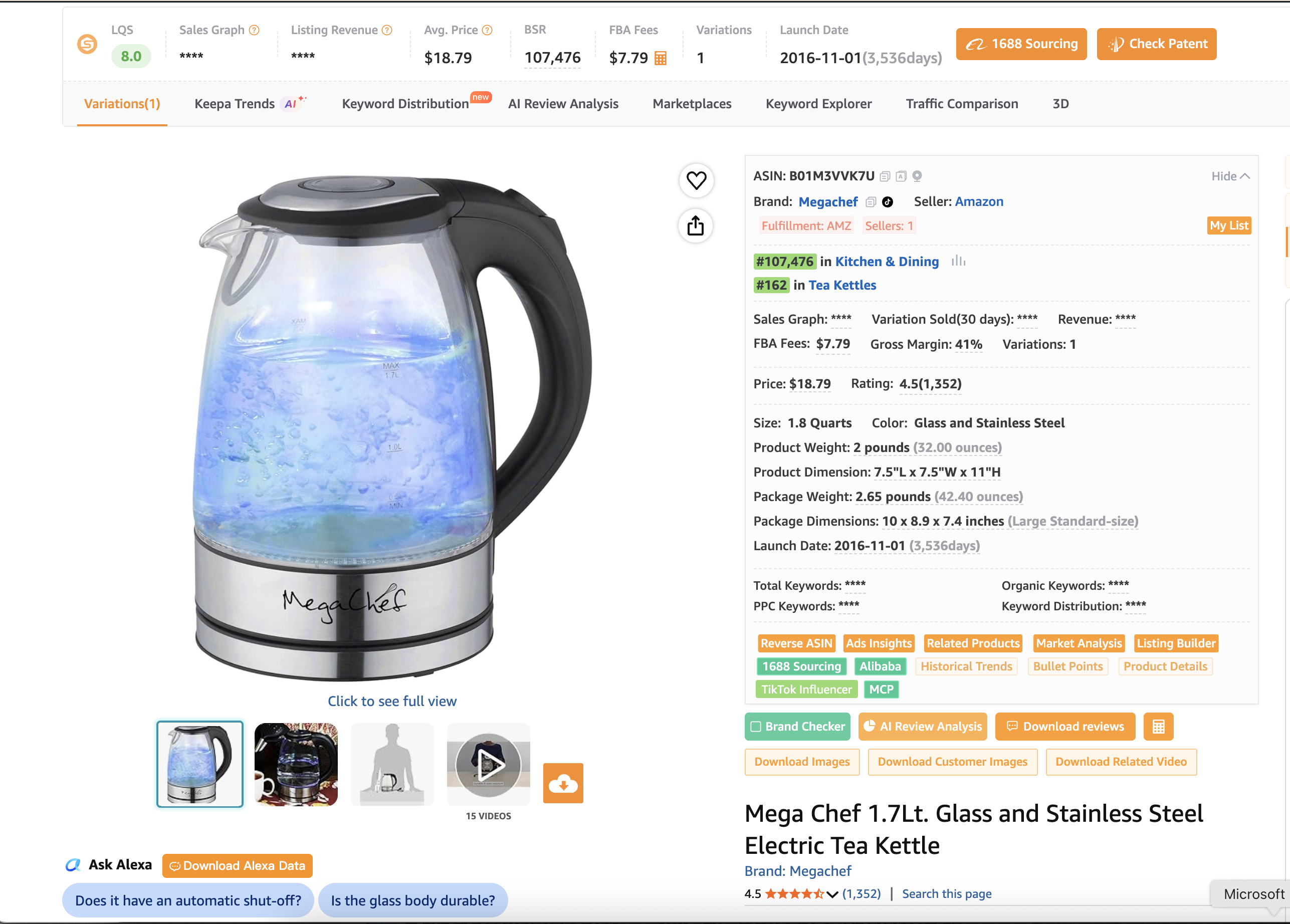
The raw CSV export flow is different: that report requires the extension to collect reviews from the listing page first.
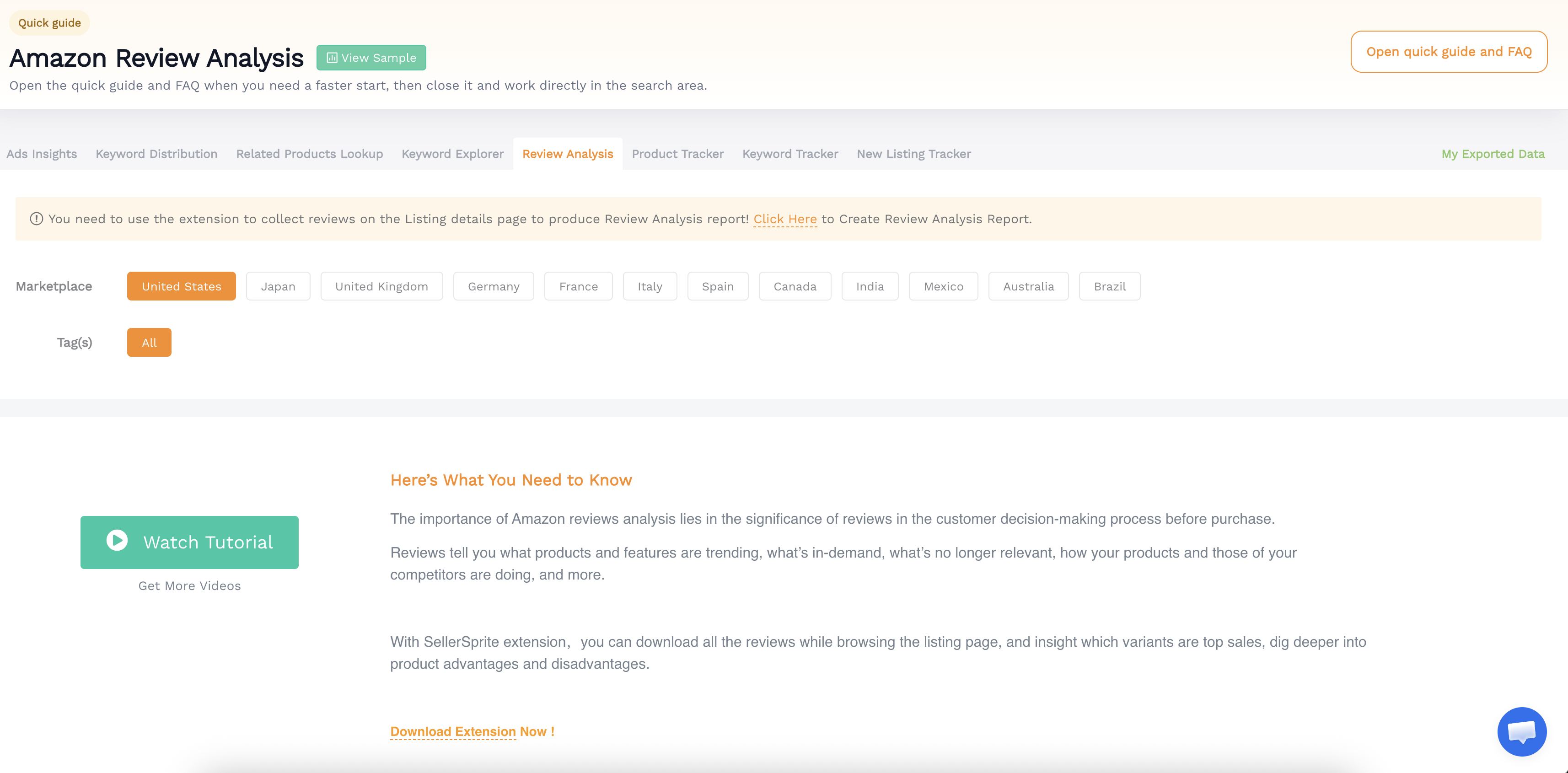
What we got on B01M3VVK7U: During the free trial, the extension exported 255 reviews (out of 1,352 total), spanning 2017–2026, with full rating distribution.
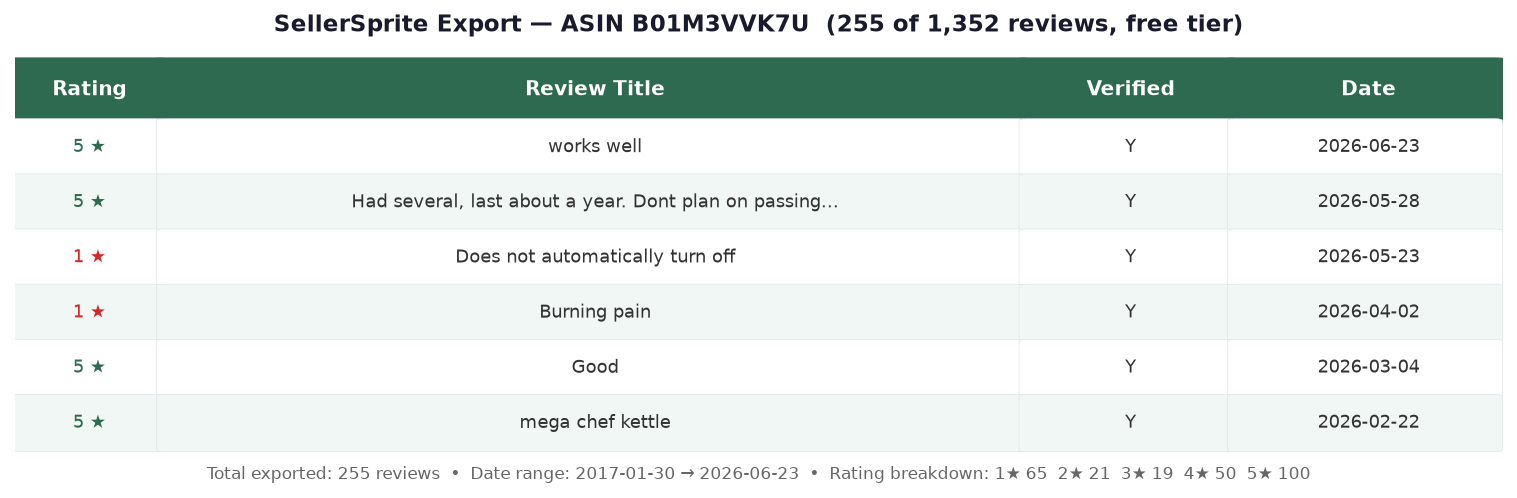
One important caveat: SellerSprite requires a logged-in Amazon session. If you scrape at high volume, Amazon may flag or block your account. This is a real risk for sellers running frequent bulk exports.
Pricing: 3-day free trial (no credit card). Paid plans start at ~$19/mo.
Scoring:
- Export format? ✅ Excel / CSV
- Date filter? ✅ Yes — date column included in export
- Star filter? ✅ Yes — rating included, filterable in Excel
- Simple to use? ✅ Install extension → visit product page → click "Download reviews"
Bottom line: The easiest dedicated review scraper. One click from the Amazon product page. Most recommended on Reddit for this job. Just be mindful of scraping volume — Amazon account risk is real.
ExportComments
What it does: ExportComments.com is a web-based Amazon review exporter — no extension needed. Paste a product URL, download reviews to CSV, Excel, or JSON.
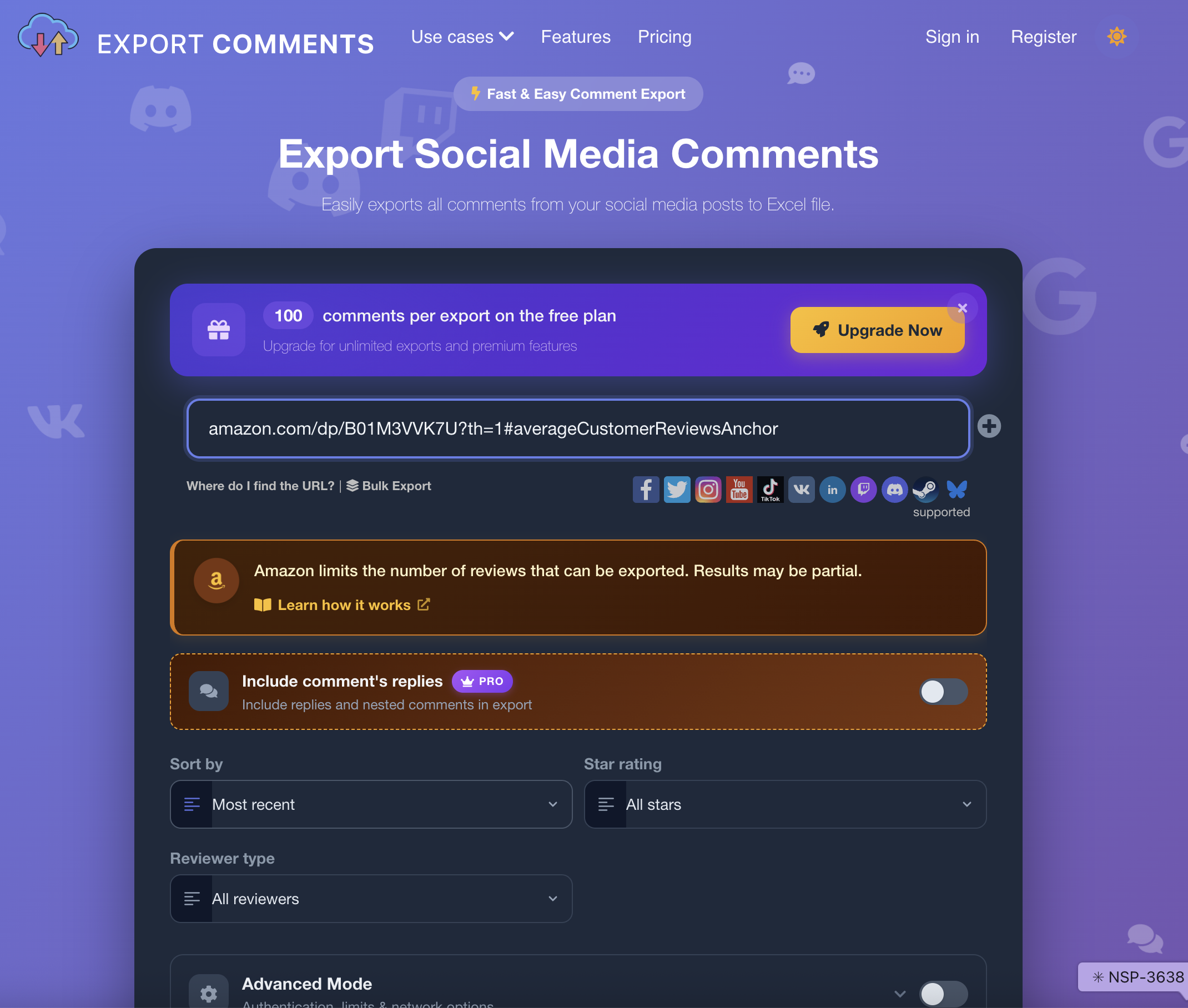
We couldn't test it: The export feature is not available on the free tier. A paid plan is required to actually download reviews. The free tier only lets you configure the export — then hits a paywall.
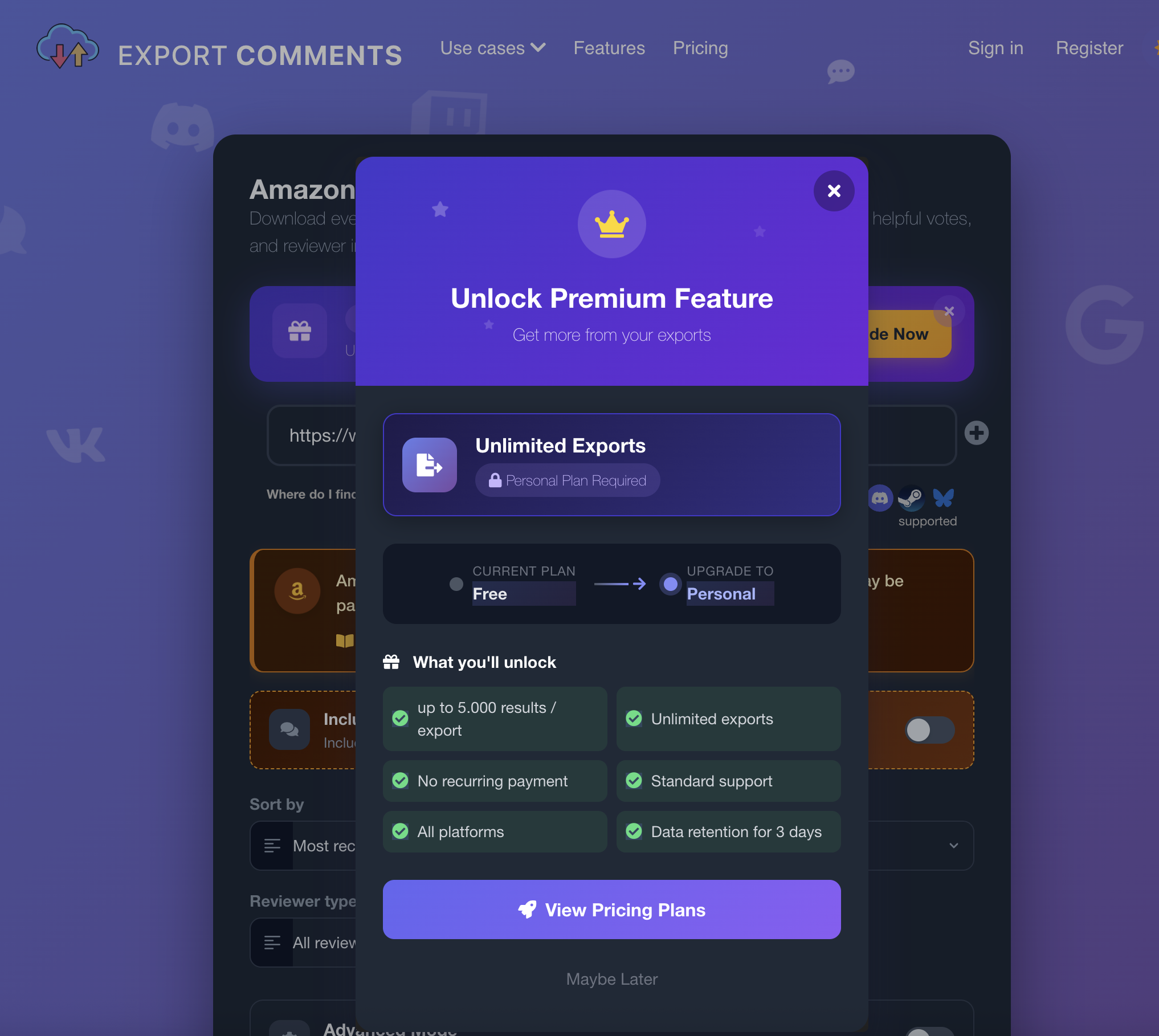
Scoring:
- Export format? ✅ CSV / Excel / JSON (paid)
- Date filter? ❌ Not available
- Star filter? ✅ Filter by star rating before export
- Needs extension? ❌ None — purely web-based
Cost: Free tier is configuration-only. Paid plan required to export.
Bottom line: No extension to install, which is the main appeal. But we couldn't verify the actual export quality since it's paywalled. If you need a web-based option without installing anything, it's worth paying for — just go in knowing the free tier doesn't actually export anything.
Descripio API (Free)
What it does: Programmatic access to Amazon review data. One API call returns all cached reviews for any ASIN as JSON — no extension, no browser, no scraping from your machine.
Who it's for: Developers and technical sellers who want to pipe review data directly into spreadsheets, Python scripts, or ChatGPT workflows. Not a point-and-click tool — you need to be comfortable with curl or a fetch call.
Setup:
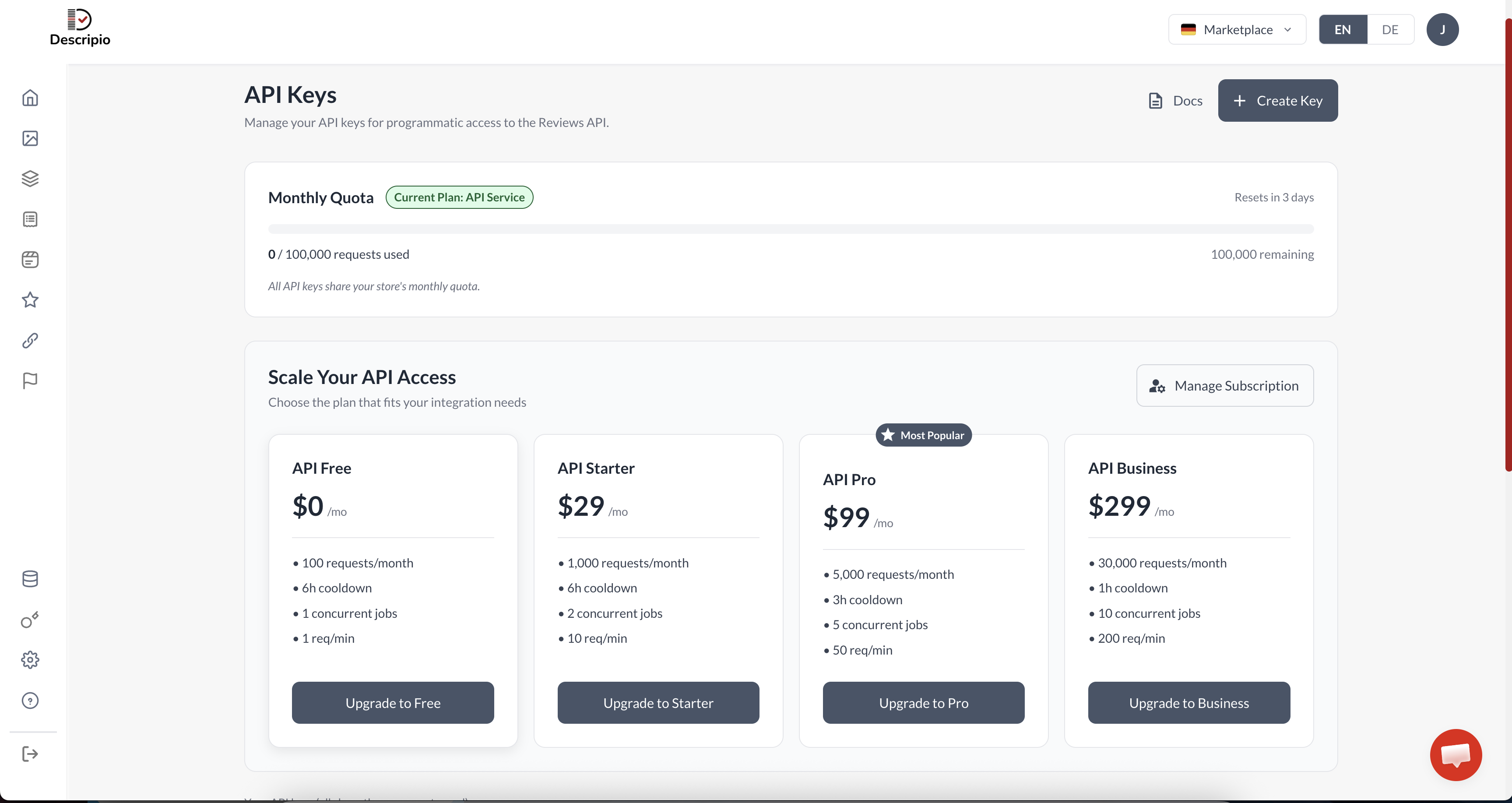
- Create a free account at app.descripio.com/signup — no credit card required
- Go to API Keys in the dashboard
- Click Create Key — copy the key and store it securely
Making the call:
The endpoint is a simple GET request with your ASIN and API key:
curl "https://app.descripio.com/api/v1/reviews?asin=B01M3VVK7U" \
  -H "Authorization: Bearer YOUR_API_KEY"
Or in JavaScript:
const res = await fetch(
  "https://app.descripio.com/api/v1/reviews?asin=B01M3VVK7U",
  { headers: { Authorization: "Bearer YOUR_API_KEY" } }
);
const data = await res.json();
console.log(data.reviewCount, data.reviews.length);
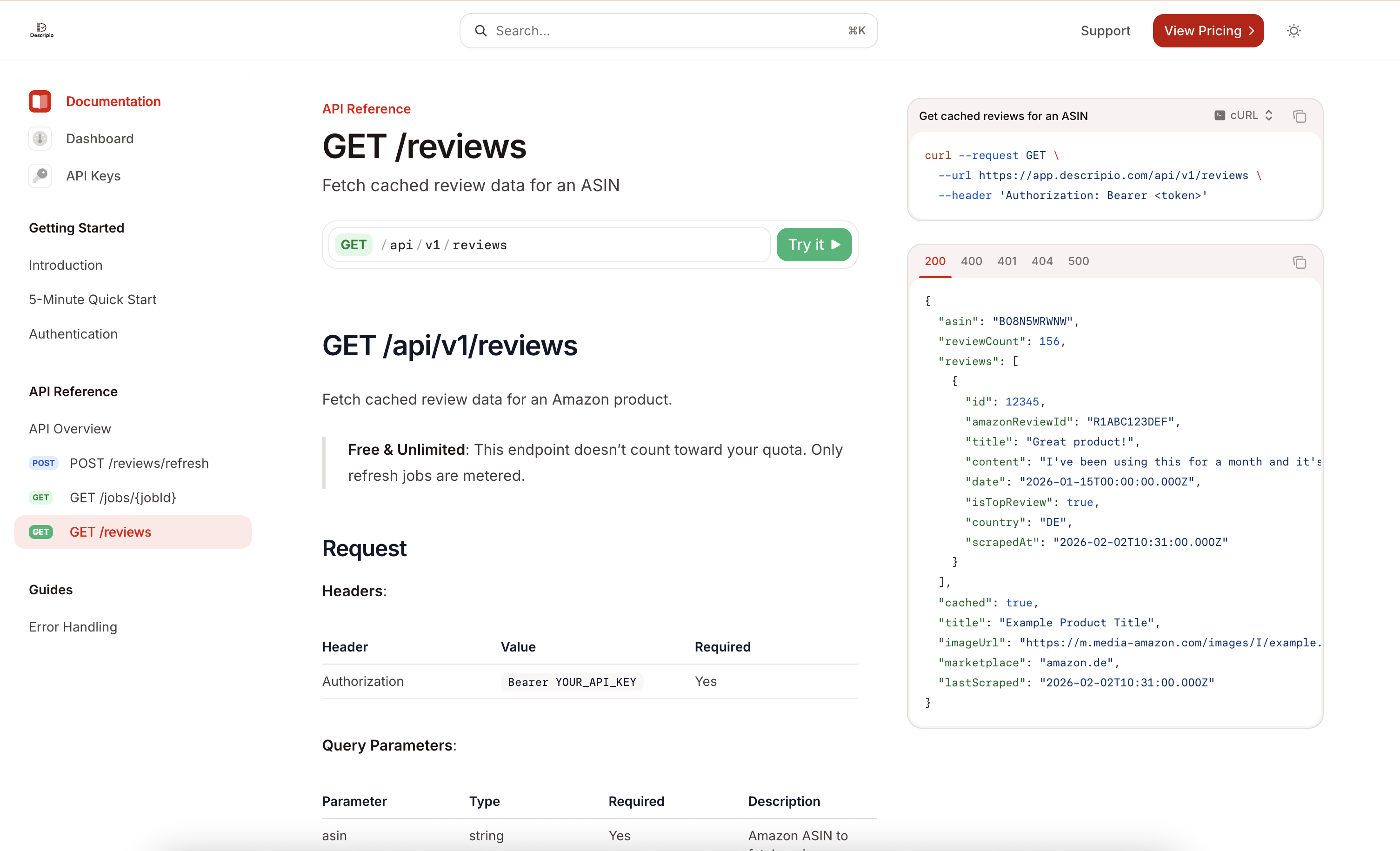
One important note from the docs: fetching cached reviews doesn't count against your quota. Only triggering a new refresh job (POST /reviews/refresh) uses quota. On the free tier that means 100 refresh requests/month — reads are unlimited.
Response object:
The top-level response contains product metadata plus the review array:
| Field | Type | Description |
|---|---|---|
asin | string | Product ASIN |
title | string | Product title |
imageUrl | string | Product image URL |
marketplace | string | Amazon marketplace (e.g. amazon.com) |
reviewCount | number | Total reviews on Amazon |
reviews | Review[] | Cached review array |
lastScraped | string | ISO 8601 — when data was last refreshed |
cached | boolean | true if served from cache |
Each item in reviews contains:
| Field | Type | Description |
|---|---|---|
id | number | Internal review ID |
amazonReviewId | string | Amazon's own review identifier |
title | string | Review headline |
content | string | Full review text |
date | string | ISO 8601 review date |
isTopReview | boolean | Amazon "top review" flag |
country | string | Reviewer country code (e.g. US, DE) |
scrapedAt | string | ISO 8601 — when this review was collected |
Convert to CSV in one line: jq -r '.reviews[] | [.date, .country, .title, .content] | @csv' response.json > reviews.csv
Pricing: Free tier: 100 refresh requests/month. Paid plans from $29/mo (1,000 requests) to $299/mo (30,000 requests). Reads are always free regardless of plan.
Scoring:
- Export format? ✅ JSON (one
jqcommand to CSV) - Date filter? ✅
datefield on every review - Star filter? ⚠️ Not a query param — filter in code after fetching
- Simple to use? ⚠️ Requires API/CLI knowledge
Bottom line: The most flexible option and the only one with no per-review cost ceiling on reads. If you can run a curl command, this gives you structured JSON you can pipe anywhere. Not for sellers who need a click-and-download interface.
Job #2: Analyzing Reviews — Get Actionable Insights
If you want a tool to extract themes, complaints, and listing recommendations from reviews automatically, these are your options.
Jungle Scout Review Analysis
What it does: Analyzes review trends, extracts positive and negative themes, and surfaces common product issues. Strong on pattern recognition across review sets.
The top-50 limit: Jungle Scout only analyzes the top 50 most helpful reviews for a product — not all reviews. For products with hundreds of reviews, you're getting a sample. This matters if you're working with high-volume ASINs.
Scoring:
- Positive analysis (what customers like)? ✅ Themes and highlights
- Negative analysis (quality issues)? ⚠️ Complaints surfaced, no issue timeline
- Review coverage? ⚠️ Top 50 most helpful only
Cost: $99/mo (7-day trial).
Bottom line: Best for sellers who want processed insights rather than raw data. The top-50 cap is a real limitation for high-review products.
Descripio App (Free)
What it does: Analyzes your Amazon reviews against your product listing. Two separate jobs in one tool: it tells you what customers love that you're not mentioning (listing gaps), and what they're complaining about (product issues and quality alerts).
Be honest: Descripio is our tool. We're scoring it hard. It's not a raw review exporter — if you need CSV download, this won't replace Review Insights 1:1.
We ran it on the same ASIN (B01M3VVK7U, 107 reviews). Here's what came out.
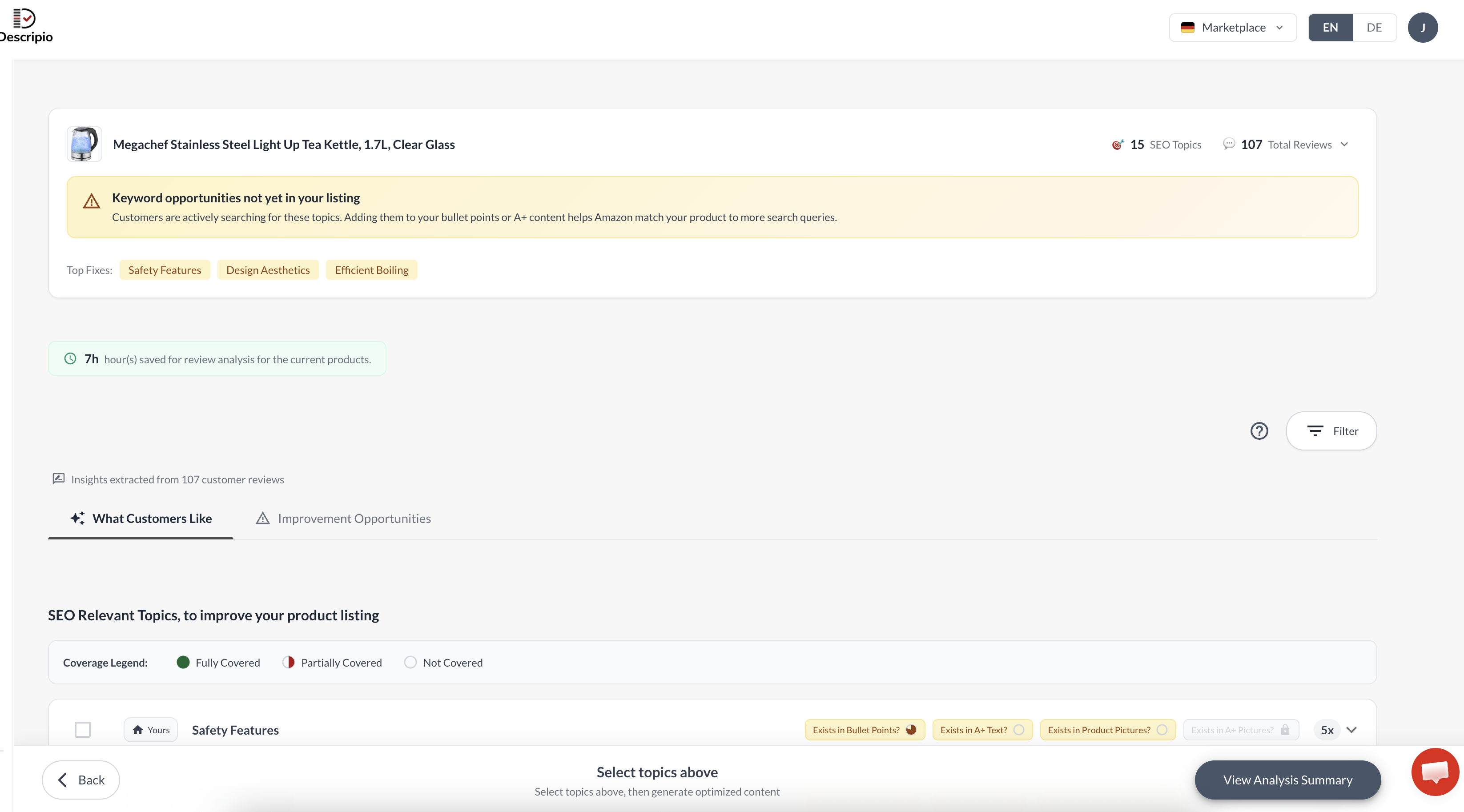
The overview tells you immediately: 15 keyword topics from reviews aren't in the listing yet, and it prioritized the top three to fix. That's the starting point — two tabs do the real work below.
What Customers Like — Listing Gaps
The first tab shows you what customers are praising and checks whether those themes are already covered in your bullet points, A+ text, and product images.
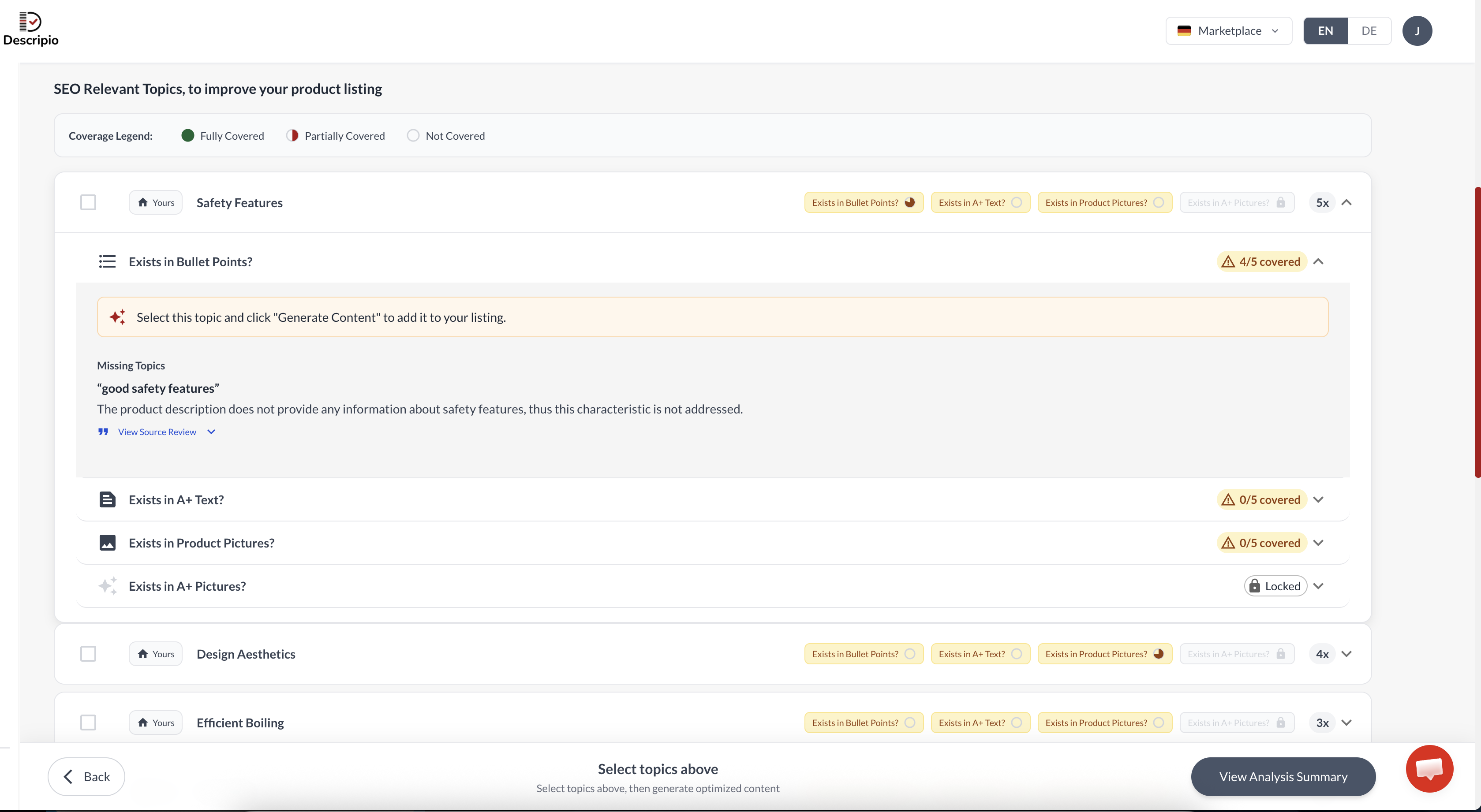
"Safety Features" comes up 5x across reviews — customers care about the no-boil-dry protection. But the listing only partially covers it in bullet points, and it's completely missing from A+ Text and product pictures.
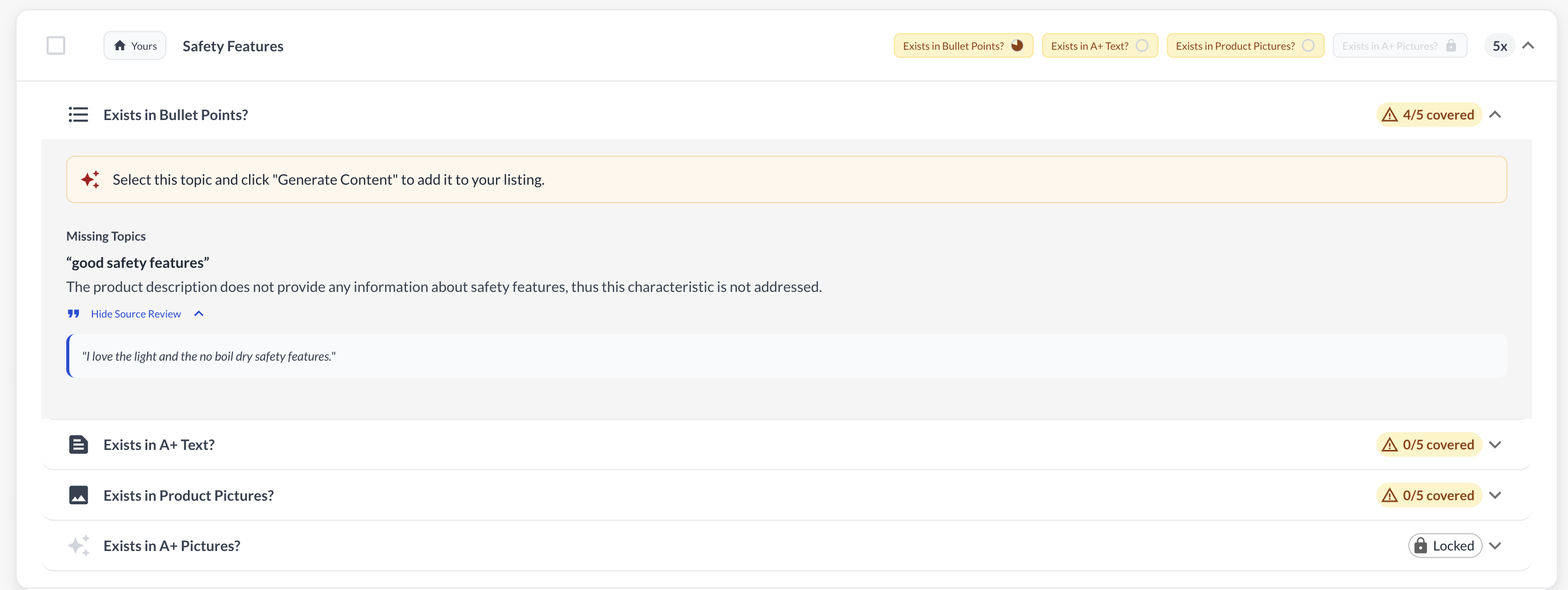
The missing topic is specific: the listing never mentions "good safety features" as a characteristic. The source review even tells you the exact language customers use. You copy that language into your bullet, click "Generate Content," done.
Improvement Opportunities — Quality Alerts
The second tab is where Descripio goes beyond listing optimization into product development intelligence. This is the part most tools skip entirely.
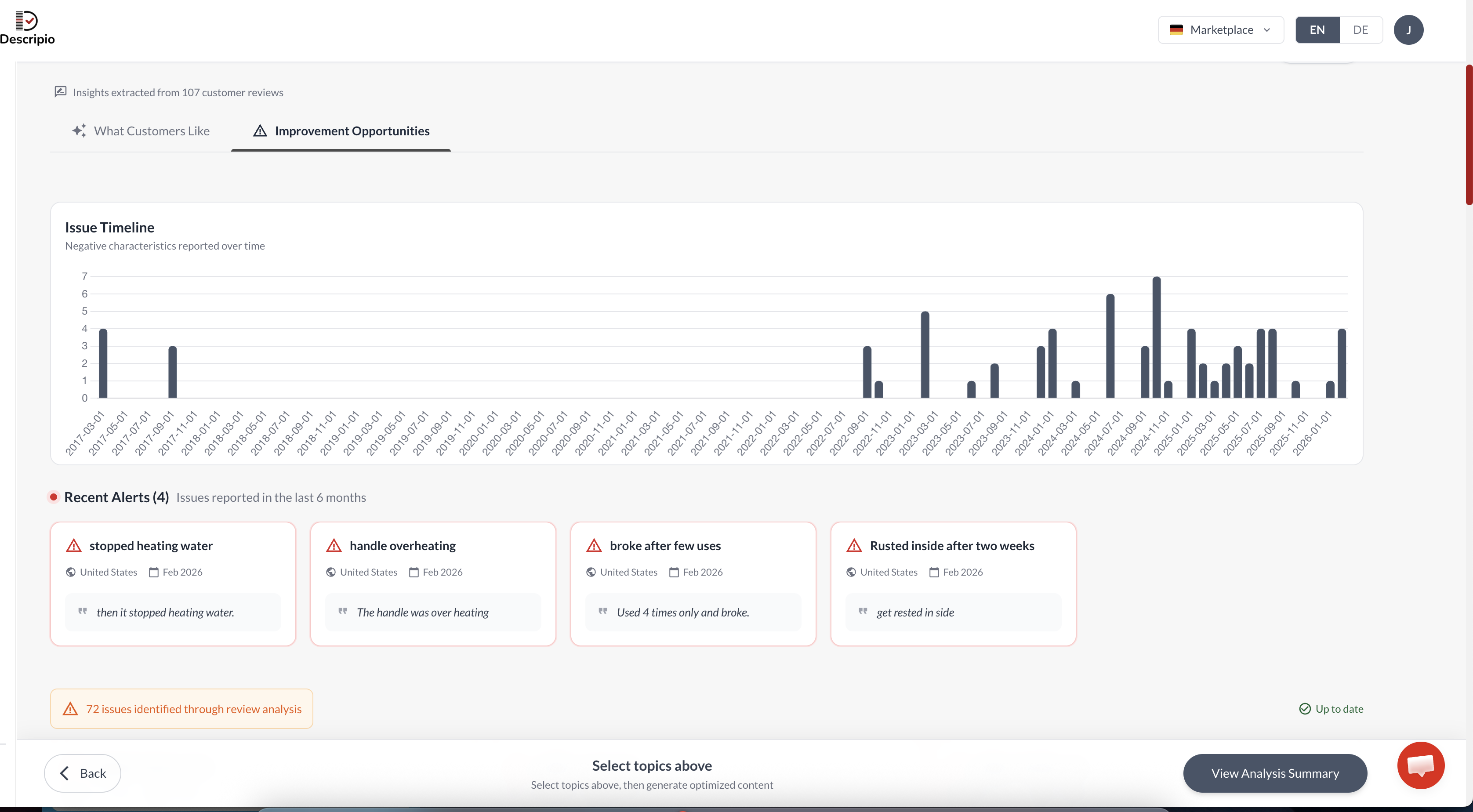
For this kettle: 72 quality issues identified from 107 reviews. The issue timeline shows complaints spiking in recent months — not a historic pattern. The 4 most recent alerts are all durability failures from February 2026.
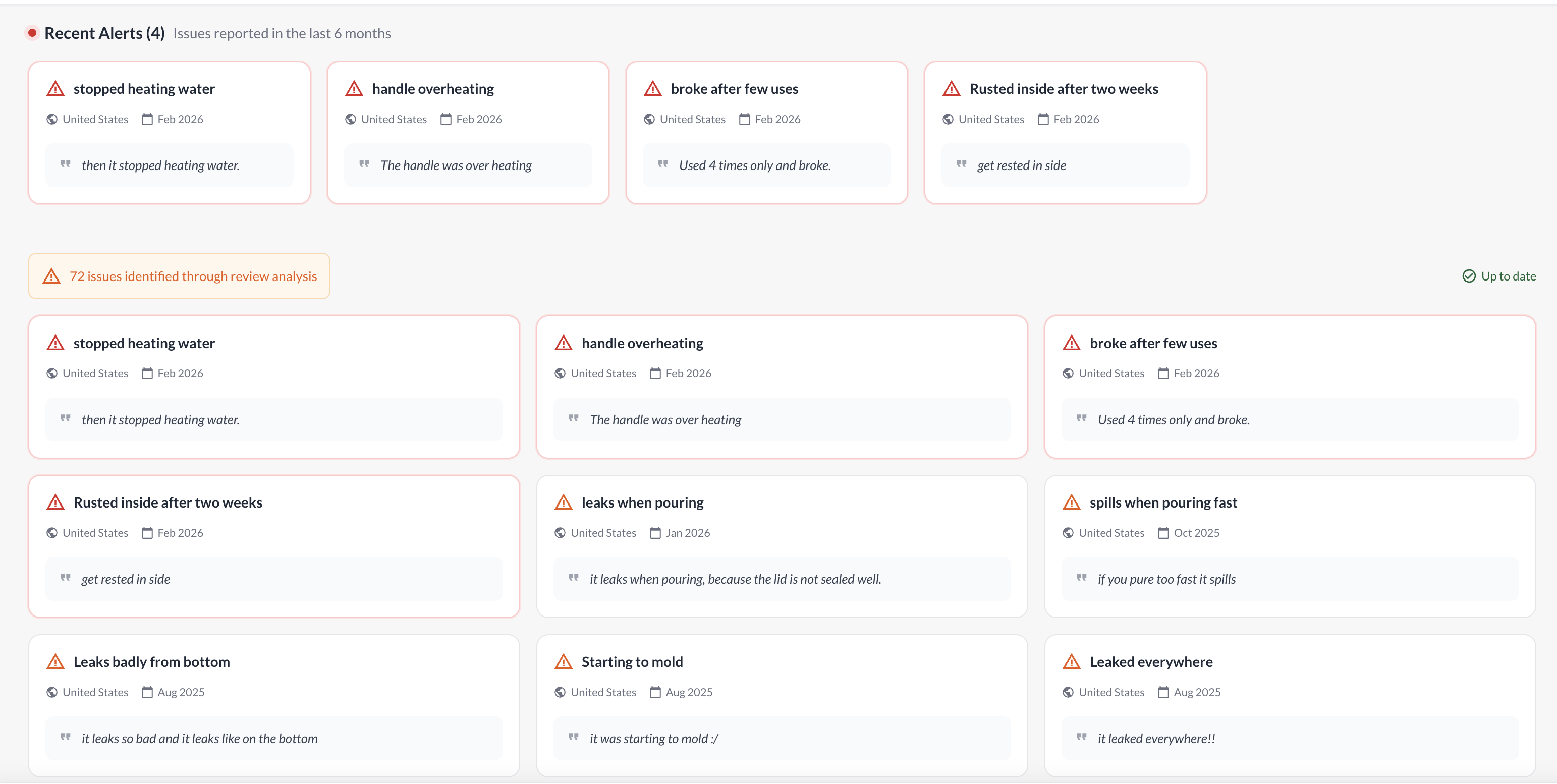
The full issue list breaks down into 9 distinct failure modes with real review quotes, countries, and dates. "Rusted inside after two weeks," "leaks when pouring because the lid is not sealed well," "starting to mold." If you're the brand owner, this is a sourcing brief for your factory. If you're a private label seller evaluating this niche, this is a product improvement roadmap.
This is what Helium 10 Review Insights never did — it exported raw reviews. It didn't tell you which issues are spiking, when they started, or what's causing repeat complaints.
Scoring:
- Positive analysis (listing gaps)? ✅ Per-topic coverage across bullet points, A+ Text, images
- Negative analysis (quality alerts)? ✅ Issue timeline, distinct failure modes, source reviews
- Review coverage? ⚠️ Top 100 most recent + 100 most helpful
Free tier: Full analysis on the free plan. No credit card required.
Bottom line: If you want to improve your listing and understand what's actually breaking in your product, this is the fastest path. One click, results in two minutes. Not a data export tool — an action tool.
Side-by-Side Comparison
Job #1: Scraping (Raw Review Export)
| Feature | SellerSprite | ExportComments | Descripio API |
|---|---|---|---|
| Export format | Excel / CSV | CSV / Excel / JSON | JSON |
| Date filter | ✅ | ❌ | ✅ |
| Star filter | ✅ | ✅ Filter before export | ⚠️ Filter in code |
| Review limit (free trial) | 255 on trial | ❌ Export requires paid plan | None |
| Needs extension? | Yes | ❌ No | ❌ No |
| Ease of use | ⭐⭐⭐⭐⭐ | ⭐⭐⭐⭐ | ⭐⭐ (requires API) |
| Price | Free trial / ~$19/mo | Paid plan required | Free |
Job #2: Analysis (Automated Insights)
| Feature | Jungle Scout | Descripio App |
|---|---|---|
| Positive analysis (listing gaps) | ✅ Themes | ✅ Per-topic, per-placement |
| Negative analysis (quality alerts) | ⚠️ Complaints listed | ✅ Issue timeline + failure modes |
| Review coverage | ⚠️ Top 50 most helpful | Top 100 recent + 100 helpful |
| Price | $99/mo | Free |
Tools We Tested That Didn't Work
You'll see these names online. Here's the reality:
Apify — There is no official Amazon API for review data. Apify hosts unofficial Amazon review scrapers built by third-party developers. The most-used one for reviews is the Amazon Reviews Scraper by hypnotic_freedom. Some scrapers work; many break as Amazon updates its pages. We tested several and most failed on current Amazon layouts. Technical sellers may find one that holds up, but reliability is a genuine problem. Proceed with caution and expect maintenance.
Stackline — Vendor-grade analytics requiring brand registry. Overkill for most sellers.
Comet AI browser — Too early-stage. Not mature enough for production use.
EcomStal — Reddit OP tried it. "Wasn't reliable." We agree.
Tools You'll See Recommended That Don't Solve This Problem
These show up in every "Helium 10 alternatives" list, and sellers routinely compare them head-to-head with Helium 10. But none of them analyze or extract the content of your reviews — they solve different jobs. Here's what each is actually for:
| Tool | What it's actually for | Handles review content? |
|---|---|---|
| Keepa | Price & BSR history tracking | No — zero review analysis |
| SmartScout | Keyword research + brand/BSR analytics | No — not review export |
| AMZScout | Product research | Review counts only, surface-level |
| Data Dive | Keyword research + pre-launch product validation | Partial — its "AI Product Brief" synthesizes competitor reviews for pre-launch research, but it doesn't monitor, extract, or analyze your own listing's reviews |
| SellerApp | Product research + Amazon PPC | No — shows review counts and rating trends, not review content |
| SellerView | Profit & P&L analytics (FBA margins) | No — a financial tool, no review features at all |
Good tools. Wrong job. If you searched "[tool] vs Helium 10" hoping to replace Review Insights, none of these will do it — they solve keyword, product, PPC, or profit problems, not "what are my customers actually telling me?" That's Jobs #1 and #2 above.
Which Path: Scrape or Analyze?
The question isn't "which tool is best." It's "which job do I actually need?"
Choose scraping (Job #1) if:
- You have a VA, analyst, or strong ChatGPT workflow
- You want to filter reviews by star rating or date in bulk
- You're building your own tracking spreadsheet
- You want flexibility over speed
Choose analysis (Job #2) if:
- You want to improve your listing directly
- You don't have time to parse raw data
- You want to know what to change, not just what the reviews say
- Speed matters more than control
Most mid-size sellers (5–20 SKUs) end up using one of each: a scraper for bulk pulls, an analyzer for listing work.
Which Tool for Which Seller Size
1–3 SKUs
ExportComments (paid, web-based) or SellerSprite (free trial). Manual is fine at this scale. Spend an hour a month. Don't pay $99 for Jungle Scout.
5–20 SKUs
SellerSprite ($29/mo) + Descripio App (free). Speed on both jobs. $30/mo pays for itself in saved time.
20+ SKUs
SellerSprite or Descripio API for scraping. Descripio App or Jungle Scout ($99/mo) for analysis. Automation is mandatory. Manual doesn't scale here.
Is Helium 10 Better Than SellerSprite?
For pure review scraping, SellerSprite wins on price (40–60% cheaper). When Review Insights was live, Helium 10's interface was slightly smoother — but that doesn't matter when the feature is offline. With Review Insights gone since December 2025, SellerSprite is your default for scraping. For review analysis, it's a different comparison — Helium 10 never had strong analysis tools.
What Real Sellers Say
The original Reddit thread that kicked off this research? Here's what sellers are actually doing:
From the OP: "Export Amazon reviews to CSV/Excel. Filter by star rating range. Filter by date range. No duplicates, no 100-review limit."
@enzoshumanty confirmed the cause: "Amazon changed their TOS so they had to disable that feature."
@Interesting-Store-15 flagged SellerSprite: "SellerSprite has free review downloads." (True — we exported 255 reviews free on our test ASIN.)
@Dependent-Highway886 shared the pain: "Had to go through and manually do this. It kinda sucks because some competitors have thousands of reviews."
@rxr77 mentioned Apify: "There are scrapers on Apify, $5/mo free credit — but reliability varies if you're comfortable with command line."
Real sellers aren't looking for perfect. They're looking for what works today.
Once you've got your reviews into a tool that actually works, the next step is using them to optimize your listing. Review-based optimization beats keyword-stuffing — your customers told you exactly what to say. You're just listening.
FAQ
What's the cheapest Helium 10 Review Insights alternative? For scraping: SellerSprite (free trial, then ~$19/mo) or Descripio API (free, no cap). For analysis: Descripio App (free). For a web-based no-extension option: ExportComments (paid plan required to export).
Can I still use ChatGPT alone to analyze Amazon reviews? Yes. Copy reviews from the Amazon page. Paste into ChatGPT. Ask it to extract themes. It works — but doesn't scale past 2–3 ASINs before your time investment becomes ridiculous.
Will Helium 10 bring Review Insights back? Maybe. "Early 2026" was the promise. Seven months past that deadline and nothing has shipped. We're not betting on it. You shouldn't either.
What's the difference between review export and review analysis? Export = raw data (CSV, filter, then you decide what to do with it). Analysis = a tool that tells you what the data means (themes, complaints, sentiment). Both are useful. Different jobs.
Does Jungle Scout analyze all reviews? No — Jungle Scout's review analysis is limited to the top 50 most helpful reviews per product. For products with hundreds of reviews, that's a meaningful sample, not the full picture.
Do Data Dive, SellerApp, or SellerView work as Helium 10 Review Insights alternatives? No. They show up in "Helium 10 alternative" lists, but none analyzes your listing's review content: SellerView is a profit/P&L tool, SellerApp only tracks review counts and rating trends, and Data Dive's AI Product Brief only synthesizes competitor reviews for pre-launch research. For actual review scraping or analysis, use the scrape (Job #1) and analyze (Job #2) tools above.
What if I have a tool you missed? The five above cover 95% of what sellers are actually using. If you've found something better, Reddit already knows about it.
Stop Searching. Start Testing.
You've got five proven options split across two jobs. Pick the one that matches your workflow — not the one with the best marketing.
Try Descripio free — no credit card, no setup. Analyze your own reviews in two minutes and see what changes you should make to your listing. Analyze your first product free.
Back to Blog