
Amazon Listing Checklist: What to Verify Before Publishing a New ASIN
Use this pre-publish Amazon listing checklist to verify titles, bullets, images, backend terms, attributes, and compliance before you launch a new ASIN.
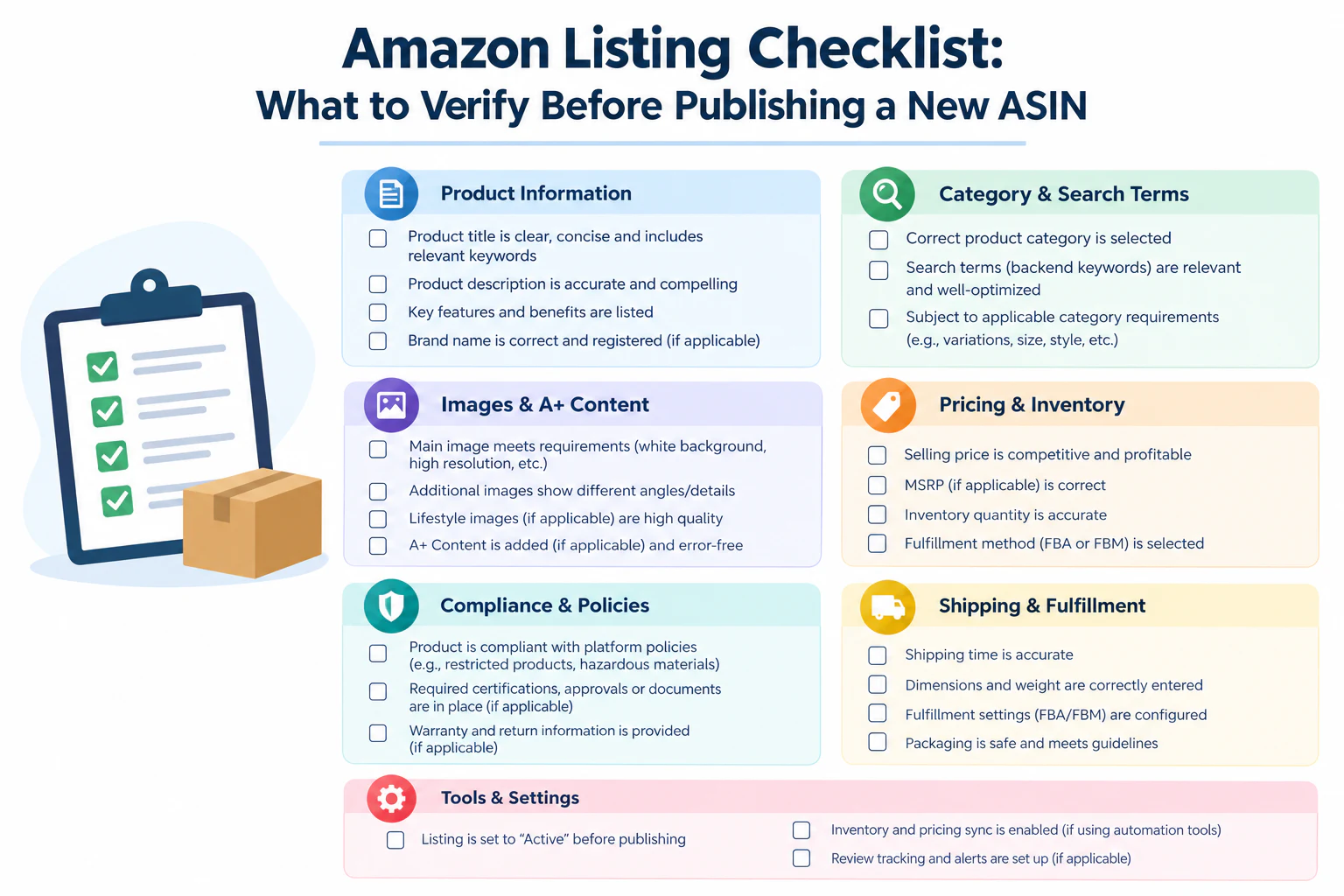
Launching a****new ASIN is one of those moments where small oversights become expensive fast. A missing attribute can suppress a listing from search entirely. A skipped compliance field can trigger a suspension. A rushed title can quietly cap your visibility for months before anyone notices. Unlike an existing listing, a brand-new ASIN has no sales history and no reviews to compensate for gaps the content has to do all the work from day one.
This checklist is built for new and private-label sellers publishing their first (or fiftieth) ASIN, and for ecommerce teams who need a standardized pre-launch process so nothing gets published half-finished. If you're reviewing a listing that's already live, use our Amazon listing SEO audit checklist instead.
Why Pre-Publish Checks Matter More for New ASINs Than Existing Ones
An established listing has momentum sales velocity, reviews, and ranking history that can carry it through minor content issues. A brand-new ASIN has none of that. Amazon's algorithm has almost nothing to go on except the content itself, which means:
Incomplete listing requirements can prevent the ASIN from being indexed in search at all.
A weak first impression (poor images, thin bullets) has no review base to offset it.
Errors in variations, attributes, or category placement are far harder to fix retroactively once the ASIN has any sales history attached.
Getting it right before publishing saves far more time than fixing it after launch. A rushed listing that goes live with gaps doesn't just underperform quietly it can also take weeks to recover once Amazon has already formed an initial impression of its relevance and quality.
The Pre-Publish Checklist
1. Title
Contains the primary keyword naturally, not stuffed
Includes required identifiers for the category (brand, size, quantity, color, model per Amazon's category style guide)
Under the character limit for the specific category (limits vary)
Free of restricted terms, promotional claims ("best," "#1," "free shipping"), and special characters Amazon disallows
Readable at a glance on mobile, where only the first portion of a long title displays
2. Bullet Points
Five distinct bullets, each covering a different benefit or use case
Secondary keywords distributed naturally across bullets, not crammed into one
No duplicate information already covered in the title
Written for the actual target audience tone and vocabulary match how they search and speak
Free of unverifiable claims that could trigger a content policy flag
3. Product Description / A+ Content
Description or A+ Content submitted and approved (A+ can take 24–48 hours to go live)
No broken image links or placeholder text left in A+ modules
Claims are accurate and compliant with category policy
Description doesn't simply repeat the bullets verbatim
4. Images
Main image meets current requirements: pure white background, product fills 85%+ of frame, no text or graphics
Minimum recommended count of secondary images included (typically 6–7)
At least one infographic-style image communicating a key differentiator
Images reflect the actual current product packaging, color, included accessories
Image file names and alt-text (where applicable) are descriptive, not generic placeholder text
5. Backend Search Terms
Backend keyword field fully utilized, without duplicating title/bullet terms
Includes relevant synonyms, spelling variations, and category-specific terminology
No competitor brand names or trademarked terms (policy violation risk)
Field is filled at launch, not left for a "later update" that often gets forgotten
Once the listing is live, the backend field should be re-checked as part of a regular Amazon listing SEO audit.
6. Attributes and Variations
All required category-specific attributes completed (material, dimensions, age range, etc. required fields vary widely by category)
Variation family (size/color) correctly structured under a shared parent
Correct category and subcategory selected a wrong category placement can bury an otherwise strong listing
Search-relevant attributes (like "for," "scent," or "style") filled in, not left blank
7. Pricing and Logistics
Price set and consistent with any MAP (minimum advertised price) agreements
Shipping weight and dimensions accurate (affects both fees and Prime eligibility)
Inventory quantity and fulfillment method (FBA/FBM) confirmed before going live
Launch pricing strategy (if different from steady-state pricing) documented so it's not forgotten after a few weeks
8. Compliance Documentation
Any required certifications, safety documentation, or country-of-origin info submitted
Category-specific approval obtained if the listing is in a gated category
Brand registry / trademark details correctly linked, if applicable
Any restricted claims (health, safety, environmental) reviewed against current policy before publishing
A Simple Way to Use This Checklist
For teams launching multiple ASINs regularly, it helps to turn this list into a shared, literal checklist a spreadsheet row per ASIN, checkbox per item rather than relying on memory. Two things this catches consistently:
Attribute gaps that don't block publishing but do suppress search visibility silently
Miscommunication between the person writing copy and the person setting up backend fields, especially when these are two different team members
A shared checklist also creates accountability. When one person is responsible for signing off on the full list before a listing goes live, it becomes much harder for an incomplete ASIN to slip through simply because everyone assumed someone else had checked it.
What Happens If You Skip This Step
Sellers who publish without a structured pre-launch review tend to run into the same handful of problems repeatedly:
Suppressed listings that technically exist but don't show up in relevant search results, because a required attribute was left blank.
Slow starts that look like demand problems but are actually content problems — the product would sell if shoppers could find it, but incomplete backend data is keeping it buried.
Costly retroactive fixes, since editing core details (category, variation structure) after a listing has sales history is riskier and slower than getting it right before launch.
Compliance issues discovered late, sometimes after a listing has already been live and generating sales, which can be more disruptive to resolve than catching them pre-publish.
Building This Into a Launch Process
For teams launching ASINs on a recurring basis, it's worth formalizing this checklist into an actual pre-launch sign-off step, rather than treating it as an informal habit. A simple version of this looks like:
Copywriter completes title, bullets, and description
A second team member fills backend attributes, keywords, and compliance documentation
A third person (or the same reviewer) runs the full checklist as a final sign-off before publishing
The completed checklist is saved alongside the listing, so there's a record of what was verified and when
If you're launching several ASINs at once, an Amazon listing generator can draft titles, bullets, and descriptions from****real customer review language, which you then check against this list.
This kind of structure doesn't need to be heavy even a shared spreadsheet with checkboxes accomplishes the goal but having some explicit sign-off step consistently catches issues that get missed when the process relies purely on individual diligence.
Final Thought
A new ASIN doesn't get the benefit of the doubt an established listing has. Running through this checklist before hitting publish title, bullets, images, backend terms, attributes, and compliance is what separates a launch that's visible and sellable from day one versus one that quietly underperforms while the seller tries to figure out why.
Frequently Asked Questions
How long does it take for a new Amazon listing to be indexed after publishing?
Indexing can happen within a few hours, but it sometimes takes up to 24–48 hours, especially if A+ Content or certain attributes are still processing. If a listing isn't appearing in search after that window, it's worth checking for missing required attributes rather than assuming it's just a timing issue.
What's the most common reason a new listing doesn't show up in search?
Missing or incomplete required attributes are the most frequent cause. A listing can look complete to the eye full title, bullets, and images while still being missing a backend field that's required for indexing in that specific category.
Should I launch with A+ Content already live, or add it after launch?
Where possible, launch with it live. A+ Content submitted after a listing has already gone live and started generating traffic means early visitors see a less complete listing than the one that will eventually convert best which can suppress early sales velocity right when it matters most for ranking.
Do all categories require the same attributes?
No. Required attributes vary significantly by category a clothing listing and a supplement listing have almost entirely different required fields. Always check the category-specific template or requirements rather than assuming a general checklist covers every field.
How is a pre-publish checklist different from a listing SEO audit?
A pre-publish checklist is about completeness and compliance for a brand-new ASIN with no data yet. A listing SEO audit (typically run on established ASINs) also factors in performance history rankings, conversion rate, and search query data which a new listing simply doesn't have yet.
Can I edit a listing after it's live if I find something missed on this checklist?
Yes, most fields can be edited after launch. The caution is mainly around variation structure and category placement, which are more disruptive to change once a listing has sales or review history attached — which is exactly why catching those two in particular before publishing matters most.
Back to Blog